Laptop listings now quote AI power the way car adverts quote horsepower: 13 TOPS, 40 TOPS, 50 TOPS, 80 TOPS, and on gaming laptops numbers like 233 or even 1,824 “AI TOPS”. So how many do you actually need? Here is a simple answer, the real number for every common chip, and what each level lets you do.
Why it matters: TOPS has become a selling point, and the gap between two laptops can look huge on paper while making little difference in daily use. Knowing where the useful lines are can save you money.
The short answer
- Under 40 TOPS: fine for everyday work. The chip’s AI engine (the NPU) handles small jobs like background blur and noise removal on video calls, but the laptop won’t get Microsoft’s Copilot+ features.
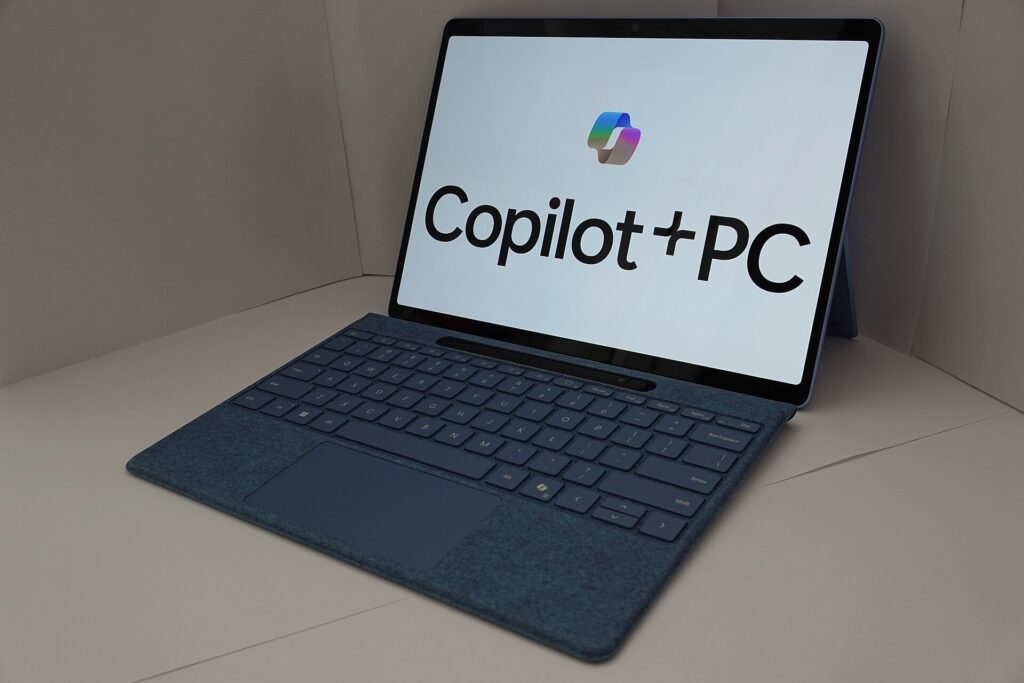
- 40 to 50 TOPS: the sweet spot for most people. 40 is Microsoft’s minimum for a Copilot+ PC, which unlocks Windows AI features that run on the laptop itself, such as Recall, live captions with translation and the image tools in Paint.
- 60 to 80 TOPS: more headroom for future features, but today’s Windows features don’t need it.
- Hundreds or thousands of “AI TOPS”: that is the graphics chip, not the NPU, and it is counted differently. It matters if you want to run image generators or big AI models on your own machine.
What does TOPS mean again?
TOPS stands for “trillions of operations per second”: how many simple maths steps an AI engine can do each second. Most laptop chips now have a dedicated AI engine called an NPU (neural processing unit) that does this work using very little battery. We explain the details, and the fine print, in our guide to AI TOPS.
The number on each chip
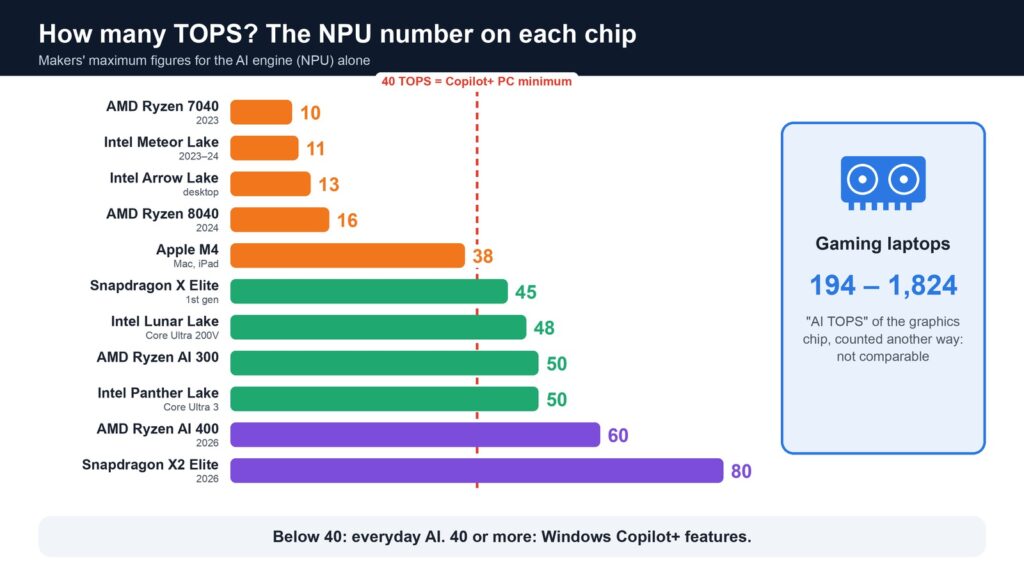
These are the makers’ own maximum figures for the NPU alone, from the oldest to the newest:
| Chip | Found in | NPU TOPS |
|---|---|---|
| AMD Ryzen 7040 | 2023 laptops | 10 |
| Intel Core Ultra Series 1 (Meteor Lake) | 2023–2024 laptops | about 11 |
| Intel Core Ultra 200S (Arrow Lake) | desktops | 13 |
| AMD Ryzen 8040 | 2024 laptops | 16 |
| Apple M4 | Macs and iPads | 38 |
| Snapdragon X Elite (1st generation) | Copilot+ laptops | 45 |
| Intel Core Ultra 200V (Lunar Lake) | Copilot+ laptops | 40 to 48 |
| AMD Ryzen AI 300 | Copilot+ laptops | 50 |
| Intel Core Ultra Series 3 (Panther Lake) | 2026 laptops | 50 |
| AMD Ryzen AI 400 | 2026 laptops | up to 60 |
| Snapdragon X2 Elite | 2026 laptops | 80 |
A few notes. The 10, 13 and 16 TOPS chips are the ones behind searches like “13 TOPS NPU”: they all fall short of the 40 TOPS line, so laptops and desktops built on them aren’t Copilot+ PCs, PCWorld and AnandTech explain. Among Intel’s Lunar Lake chips, the Core Ultra 7 and 9 models reach 47 or 48 TOPS and the Core Ultra 5 models 40. Apple rates the M4’s Neural Engine at 38 TOPS but has not published a figure for the newer M5, and Macs don’t use Microsoft’s Copilot+ label anyway.
What each level can actually do
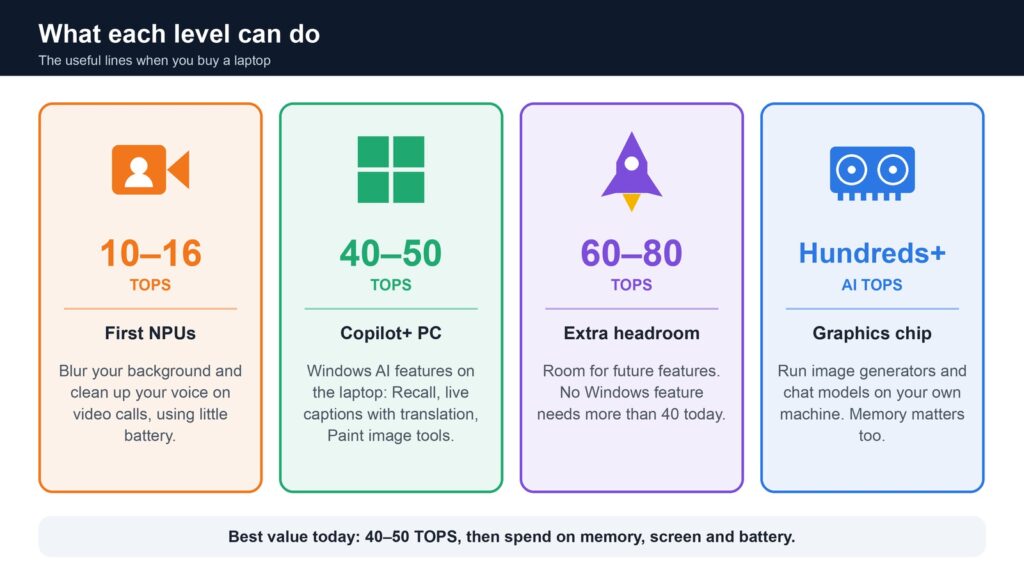
10 to 16 TOPS. These first NPUs were built for light, always-on jobs: blurring your background or cleaning up your voice on a video call without draining the battery. Everything else AI-related runs on the main processor, the graphics chip or in the cloud, just as it did before NPUs existed.
40 to 50 TOPS. This is where Windows starts using the NPU for features of its own. Microsoft’s developer guide says Copilot+ PCs rely on an NPU that can do more than 40 trillion operations per second. Every current Snapdragon X2, Ryzen AI 400 and Core Ultra Series 3 laptop clears that bar.
60 to 80 TOPS. More TOPS can help apps that run AI on the NPU for longer, but no Windows feature today requires more than 40. If two laptops are otherwise equal, a higher number is a nice bonus, not a reason to pay much more.
The big gaming-laptop numbers. Nvidia lists “AI TOPS” for its laptop graphics chips: from 194 for the RTX 4050 Laptop GPU and 233 for the RTX 4060, up to 1,824 for the RTX 5090, according to Nvidia’s comparison table. These come from the graphics chip’s AI cores, not the NPU, and the newest figures use very small number formats that make them look bigger. LaptopMedia notes that the RTX 5050 does about 105 TOPS at standard precision but around 420 when counted with the tiny FP4 format and a shortcut called sparsity, and that the older RTX 4070 reaches the same 420 at a more precise format. Don’t compare them with NPU TOPS.
So which should you buy?
- Students, office work, browsing: any recent laptop works. If you want the new Windows AI features, look for the Copilot+ PC label, which means 40 TOPS or more.
- You like trying new AI features: a 50 TOPS chip is plenty. Spend the difference on more memory (16 GB or more) and a better screen.
- You want to run AI image or chat models yourself: the graphics chip and its memory matter far more than the NPU. That is the idea behind Nvidia’s RTX Spark laptops.
- You use a Mac: the TOPS race doesn’t apply in the same way. Apple’s own AI features are designed for its chips.
Bottom line: 40 TOPS is the line that matters today. Above 50, battery life, memory, screen and price will change your experience far more than the extra TOPS.
Read next
- What are AI TOPS? NPU TOPS in laptops explained
- Nvidia RTX Spark: laptops that run big AI models offline
- GPT-6 in ChatGPT: Blender, Canva, Photoshop and other apps
Show sources (16)
- Copilot+ PCs developer guide, Microsoft Learn, updated August 2026
- AMD Unveils Ryzen 8040 Mobile Series APUs: Hawk Point with Zen 4 and Ryzen AI, AnandTech, December 2023
- The refresh that wasn’t: AMD announces Hawk Point Ryzen 8040 series, Tom’s Hardware, December 2023
- Intel’s Arrow Lake downgraded its AI to make gamers happy, PCWorld, October 2024
- Intel officially unveils Lunar Lake, its Copilot+ AI PC chip, Engadget, September 2024
- Intel Lunar Lake is efficient, powerful, and a hopeful turning point, Club386, September 2024
- Apple introduces M4 chip, Apple, 7 May 2024
- Apple goes all in on AI acceleration with M5 MacBook, iPad, and Vision Pros, The Register, 15 October 2025
- Snapdragon X2: Qualcomm presents the second generation of its notebook processor, heise, 24 September 2025
- Snapdragon X2 Elite vs Snapdragon X Elite: Here’s what’s new, Tom’s Guide
- AMD announcements at CES 2026, AMD, 5 January 2026
- AMD updates its notebook chips with Ryzen AI 400, Galaxus, January 2026
- Intel presents new Core Ultra Series 3 notebook chips, Galaxus, January 2026
- The complete list of Intel Panther Lake laptops, Ultrabookreview, updated 23 September 2026
- Compare GeForce gaming laptops, Nvidia, accessed 8 November 2026
- NVIDIA GeForce RTX 5050 joins our AI hardware performance rankings, and matches RTX 4070, thanks to FP4, LaptopMedia
The week's best tech stories, free
One email a week with the stories that matter, explained simply. No spam.